Zaaksysteem.nl has updated its date fields to the ZULU time zone (UTC +0), in accordance with the ISO 8601 standard for recording dates and times. Since the Netherlands uses UTC +1 in winter and UTC +2 in summer, this can result in incorrect dates being inserted into documents generated via xential. This article describes how to adjust the date fields in xential to account for this change.
Step-by-step guide
Follow the steps below for all date questions that are populated from Zaaksysteem.nl via an XPath query.
1
In xential|studio, open a date question that is populated from Zaaksysteem.nl.
2
Go to Links and select the XPath query.
3
Click Edit.
4
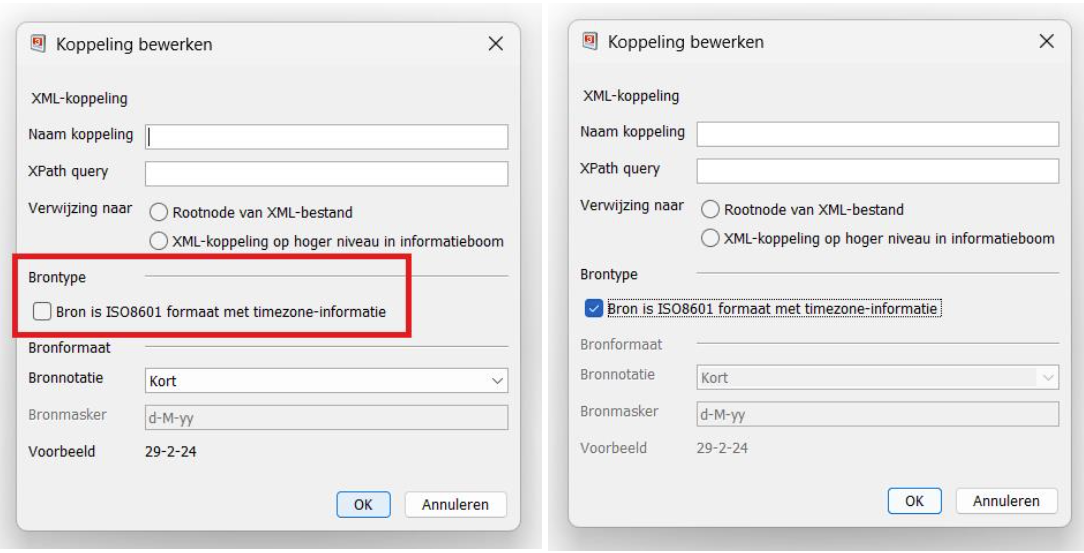
Under Source type, check the icon next to Source is ISO8601 format with timezone information.
5
Click OK twice.
6
Repeat the steps above for all date questions that are populated from Zaaksysteem.nl via a link.
Result
The date fields in xential now account for the ZULU time zone and display the correct date in the generated document, regardless of whether it is winter or summer time.