In writing, items are often listed in a specific order. A list typically consists of an introductory sentence followed by the list items, each preceded by a number, dash or bullet. But when do you start an item with a capital letter, and which punctuation mark belongs at the end? This article describes the writing convention and how to apply it in xential.
Writing convention
The general writing advice for lists is as follows:
- If the items consist of complete sentences: start each item with a capital letter and end it with a full stop.
- If the items consist of phrases: start each item with a lowercase letter and end it with a semicolon. Only the final item ends with a full stop.
- If the items consist of one or two words: start each item with a lowercase letter and omit punctuation.
Punctuation between answers or repetitions
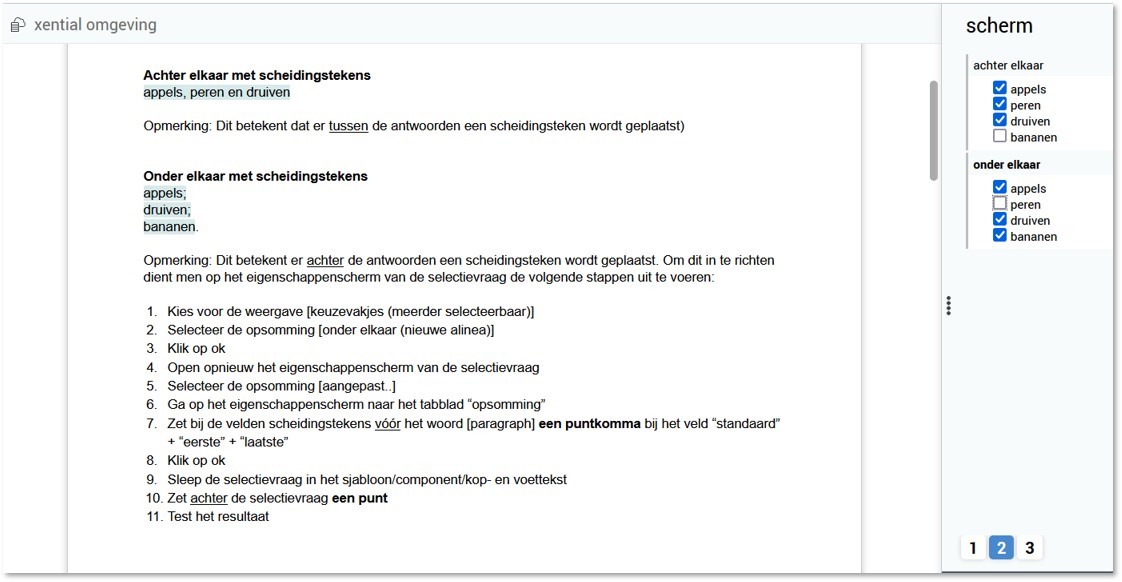
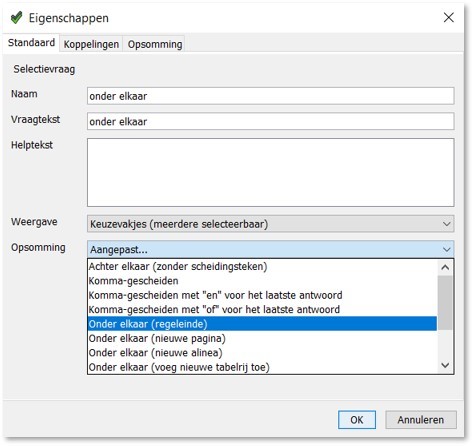
For the question types selection question and group, xential offers different list types on the standard properties screen, optionally with a separator. Separators are always placed between multiple selected answers or repeated groups.
Punctuation after answers or repetitions
For a vertical list, the template builder has two options:
- Use no punctuation (for example with the option "below each other (new paragraph)").
- Place punctuation after each list item.
The step-by-step guide below uses the second option, with a full stop after the final item.
Step-by-step guide
![List tab with semicolons before [paragraph] in the Default, First and Last fields](https://s3-eu-central-1.amazonaws.com/euc-cdn.freshdesk.com/data/helpdesk/attachments/production/80081303803/original/4TGt04uIps12DN3TIIMPmfnrSB-6fkXSQQ.jpg?1645801473)
Result
When multiple answers are selected, each list item ends with a semicolon, except for the final item, which ends with a full stop. The list now follows the writing convention for phrases.