All SaaS customers of xential have access to two environments: a test environment and a production environment. This article describes the purpose of both environments and how to transfer templates from test to production.
Test environment
New templates are built in the test environment, including their associated headers, footers and components. There are no statuses in this environment, as the test environment is not available to end users.
Once a template is ready and has been thoroughly tested, you can export it. During export, a dialogue window appears in which you can select which headers, footers and components should be included. Include these if they are not yet present in the production environment, or if changes have been made that have not yet been applied to production.
Production environment
The exported template from the test environment is imported into the production environment. After import, the template automatically receives the status T (test). This also happens when you edit a template with status P (production) in xential|studio.
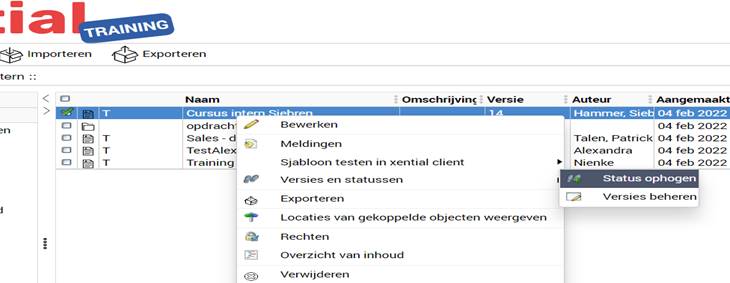
To make the change available to end users, you must raise the status to P.
Step-by-step guide: raising the status to production
Important
- When you make a change to a template, component or header/footer, the status is automatically reset to T. The last version with status P remains active for end users in the meantime.
- The change only becomes visible to end users after you have raised the status to P.